◆ Capture → Sale: the end-to-end flow
Photo + spoken description, transcribed and condensed on-device for free, used to seed LLM image tagging, optionally stickered and/or appraised with tokens — then sold and synced across PROSALE / EstateSail / TroveSnap by one QR code.
Capture
on-device · freeSeller photographs the item and speaks a quick description — hands-free, no form while walking the sale.
Transcribe locally
on-device · freeA local speech model (Whisper-class) turns the voice note into text on the device, offline — no API cost, works on spotty sale-site wifi.
Condense locally
on-device · freeThe transcript is condensed into structured candidate fields (title, attributes, condition, asking price) and token-trimmed to fit the tagging model's prompt limit.
LLM image tagging (seeded by the description)
deterministic + light LLMThe condensed text seeds the image tagger, so tags are specific ("mid-century", "oak", "dovetail") instead of generic. Produces treasure tags, category, and marketplace fields.
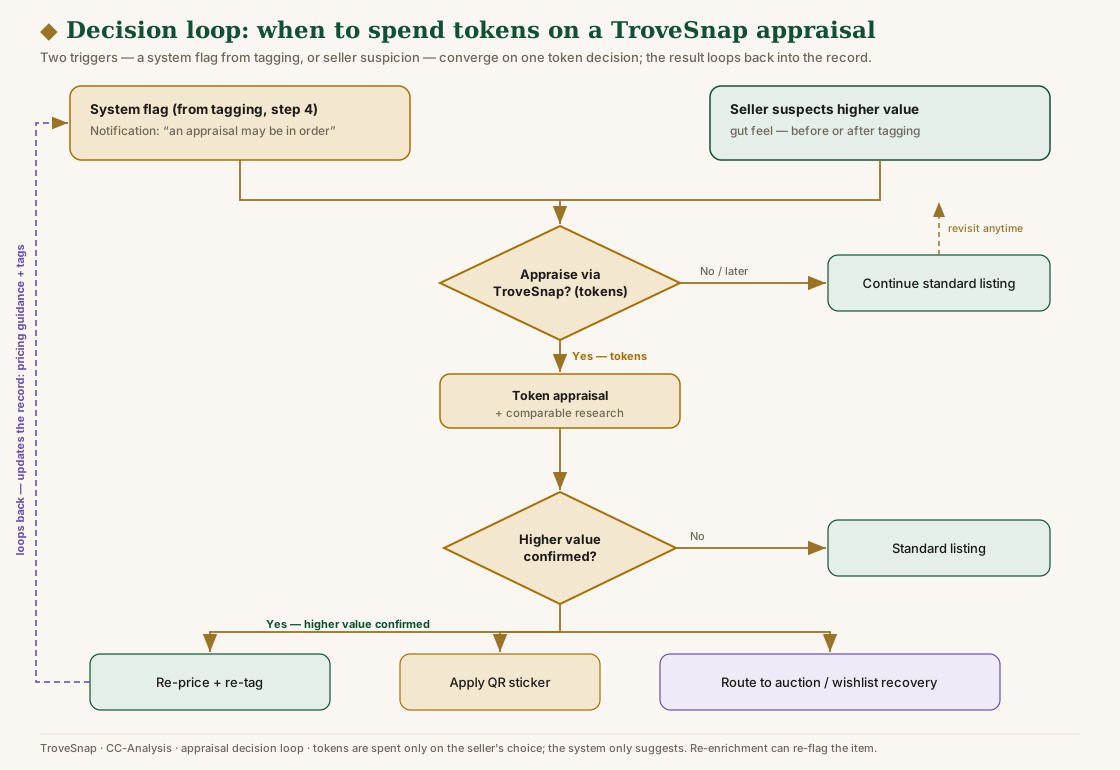
Appraisal decision loop — token-metered, before or after
token-meteredTwo triggers reach this step: the system flag from tagging above, or the seller's own suspicion that an item is worth more. The seller decides whether to spend tokens — the system only suggests, it never spends on its own.
Appraise → higher value confirmed? If yes: re-price + re-tag, apply a QR sticker, and route to auction / wishlist recovery; the result loops back into the record (and can re-flag it). Decline or "not higher value" → standard listing, revisitable anytime.
Sticker — optional, on auctionable items
label · free packs · $Apply a QR sticker — a pre-printed pack (blank code, binds on first scan) or print-your-own (code minted from the record). Bind = scan sticker → this item. Both synchronize to the account. Used selectively on items the seller knows can be auctioned later → item-level tracking from day one.
Review → promote → canonical
review gateThe candidate hits the review queue; the seller approves/edits. Only promoteInventoryCandidate() writes the canonical item — the QR code travels with it. Nothing publishes without approval.
On the floor
deterministic · freeThe QR is the price tag and the buyer portal (scan → public Trove Go listing). Every hunter scan is an anonymous interest signal that gauges auction demand per item.
Checkout & sold capture
Auth / connectorWhoever rings the sale — TroveSnap scan-PWA, PROSALE, EstateSail, or Square + manual — the item is keyed by its QR code, so a single itemized sold event flows back. No CSV guesswork.
What's Next
deterministic comps · $Reconciled in real time. Sold → recovered-revenue analytics; unsold → disposition routing (auction export, wishlist recovery), informed by demand + scan-interest.
Full decision flow — every branch
The same journey as a decision flowchart: decision diamonds, branch outcomes, loop-backs, and badges (needs research, needs approval, tokens, optional, review, buyer-facing, action). Split into two readable halves; a single-page overview is also available. Nothing goes canonical or public without seller approval; tokens are spent only on the seller's choice.
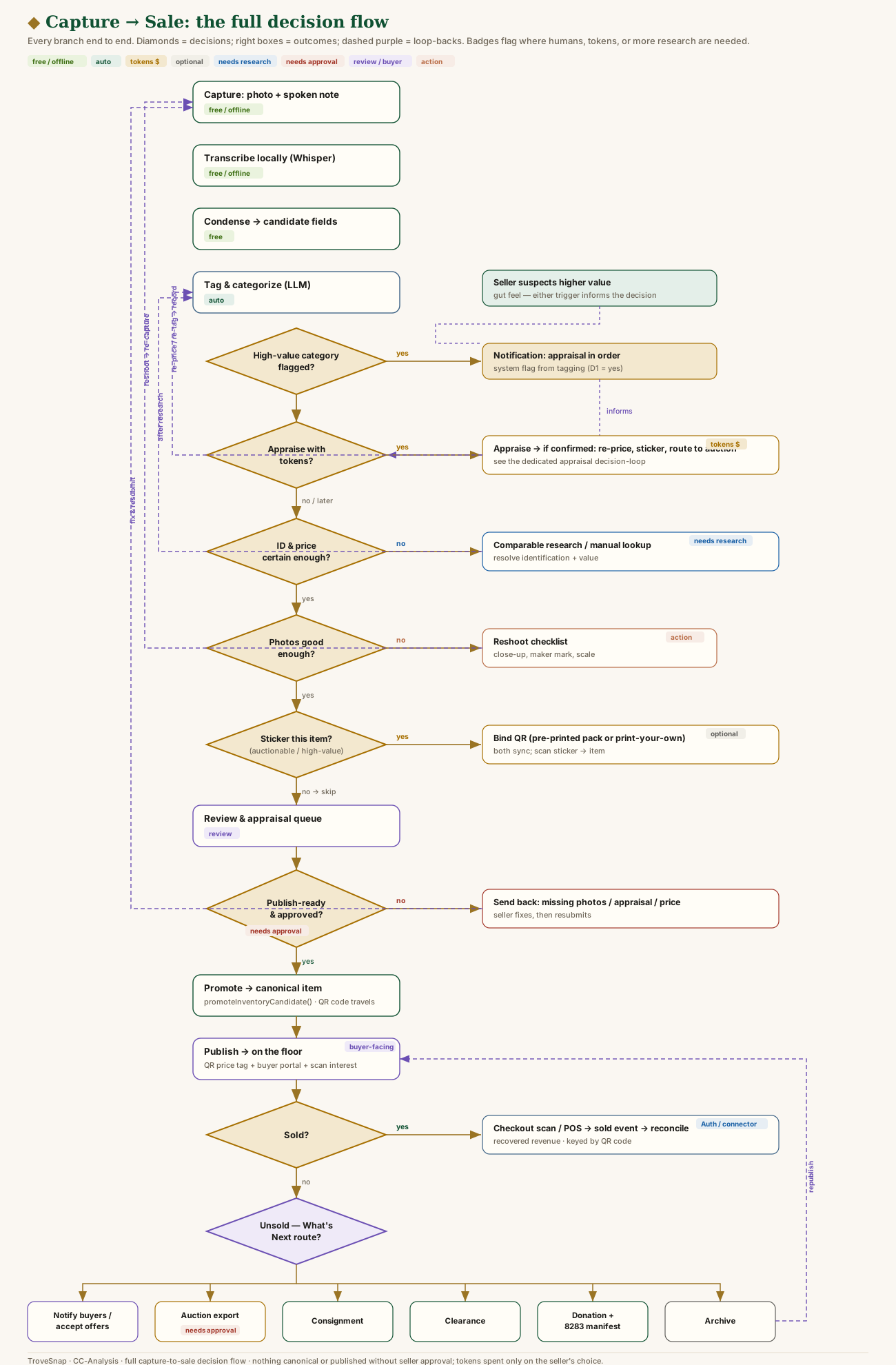
Part A — capture → publish
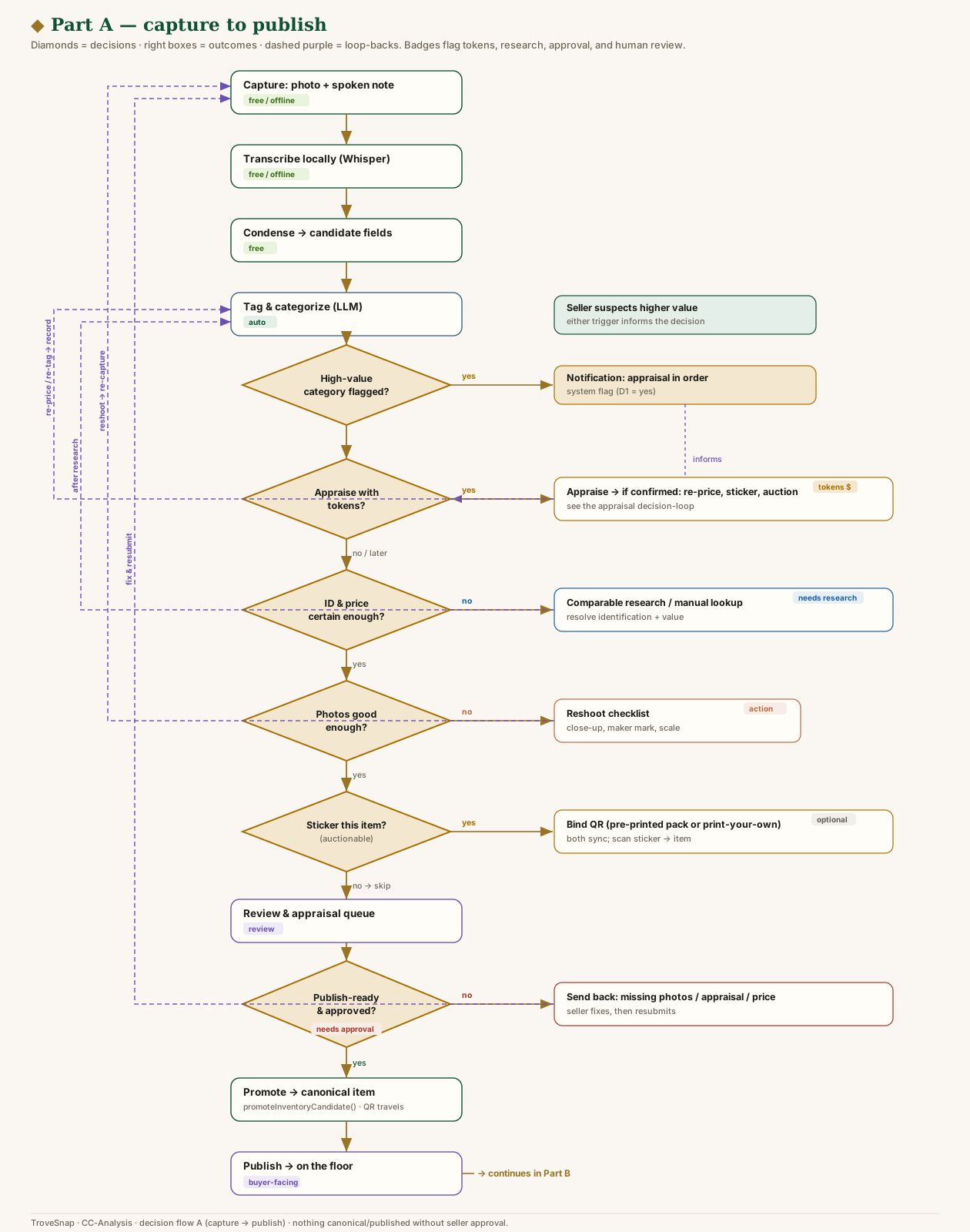
Part B — sale → disposition
Sticker sync — PROSALE / EstateSail / TroveSnap
The QR code is the shared item identity that threads all three systems. TroveSnap owns the canonical record, demand, and disposition; the POS owns checkout. The code is the join key.
ts:ITEM (opaque — no price/data inside)TroveSnap
- Mints the item + QR code
- Prints label / activates pack code
- Buyer portal + scan-interest
- Checkout scan-PWA (offline-first)
- Reconcile → What's Next
(or shared printed label)
matched by code
PROSALE
- Code used as SKU / lot
- Rings sale · Square payment
- Emits sold report (CSV / API)
EstateSail
- Code used as SKU
- Square line-item sale
- Emits sold report
inventory_status_events. Real-time where an API exists; CSV-import fallback matched by code otherwise (reusing existing reconciliation).
Sync rules & guarantees
- The code is the join key — one opaque id maps the physical item across TroveSnap, PROSALE, EstateSail, and Square. No price or PII is encoded in it.
- Idempotent + offline-first — binding and sold events are dedupe-safe; codes are pre-generated so binding needs no server round-trip; events queue locally and sync on reconnect.
- Both label sources sync — pre-printed packs (bind on first scan) and print-your-own (minted from the record) register identically.
- Don't rebuild payments — Square (or the POS's processor) takes the money; TroveSnap reconciles item ↔ money by code.
- Don't compete on the scan — interop with PROSALE/EstateSail sold reports; the moat is the demand graph + marketplace + disposition the code feeds.
- Contract holds — connectors/scans write candidates + events only;
promoteInventoryCandidate()stays the single canonical writer, post-review.